How to Build a Bookkeeping System in Google Sheets
Build a bookkeeping template in Google Sheets with a running balance and category totals, and attach a receipt to every entry for a clean audit trail.

For a freelancer or a small business, bookkeeping software can feel like using a forklift to move a coffee cup. You need to know money in, money out, and what’s left, not a full accounting suite.
Google Sheets handles that beautifully. A single-entry ledger with a running balance covers most small-business needs, and it costs nothing.
This guide builds a bookkeeping template Google Sheets runs for free: every transaction logged, a live running balance, and category totals for tax time.
Key Highlights
- A simple Google Sheets bookkeeping system is a single-entry ledger: date, description, category, money in, money out, and a running balance.
- One formula keeps a live running balance after every entry.
- SUMIF totals income and expenses by category, which is exactly what you need at tax time.
- Category dropdowns keep your books consistent and your totals correct.
- Clean books need a paper trail. UpSheet is a Google Sheets extension by The Conductor that lets you attach a receipt or invoice to each ledger entry, turning your sheet into a genuine, auditable record.
What does a bookkeeping template Google Sheets build need?
Open a new Google Sheet and create these columns:
- Date (A)
- Description (B)
- Category (C)
- Money in (D)
- Money out (E)
- Balance (F)
This is a single-entry ledger: money coming in goes in column D, money going out goes in column E, and the balance tracks what’s left.
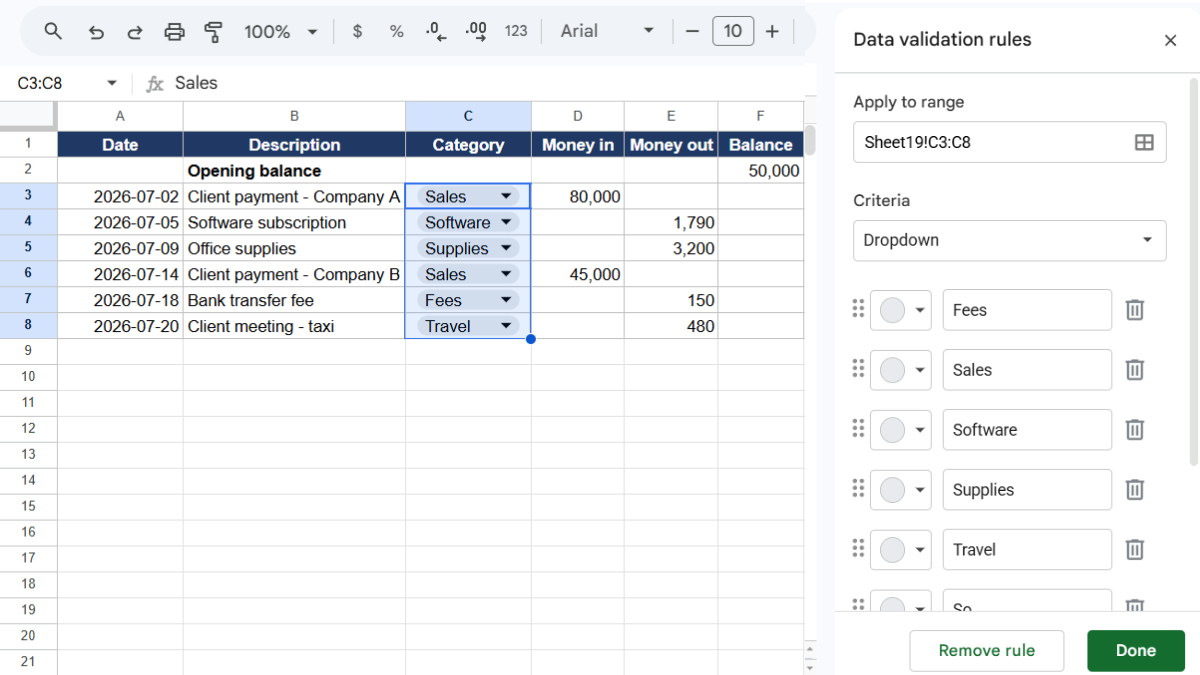
Make Category a dropdown (Data → Data validation → Dropdown) with your categories: Sales, Supplies, Software, Fees, Travel, and so on. Consistency here is what makes your tax totals trustworthy.
How do you keep a running balance?
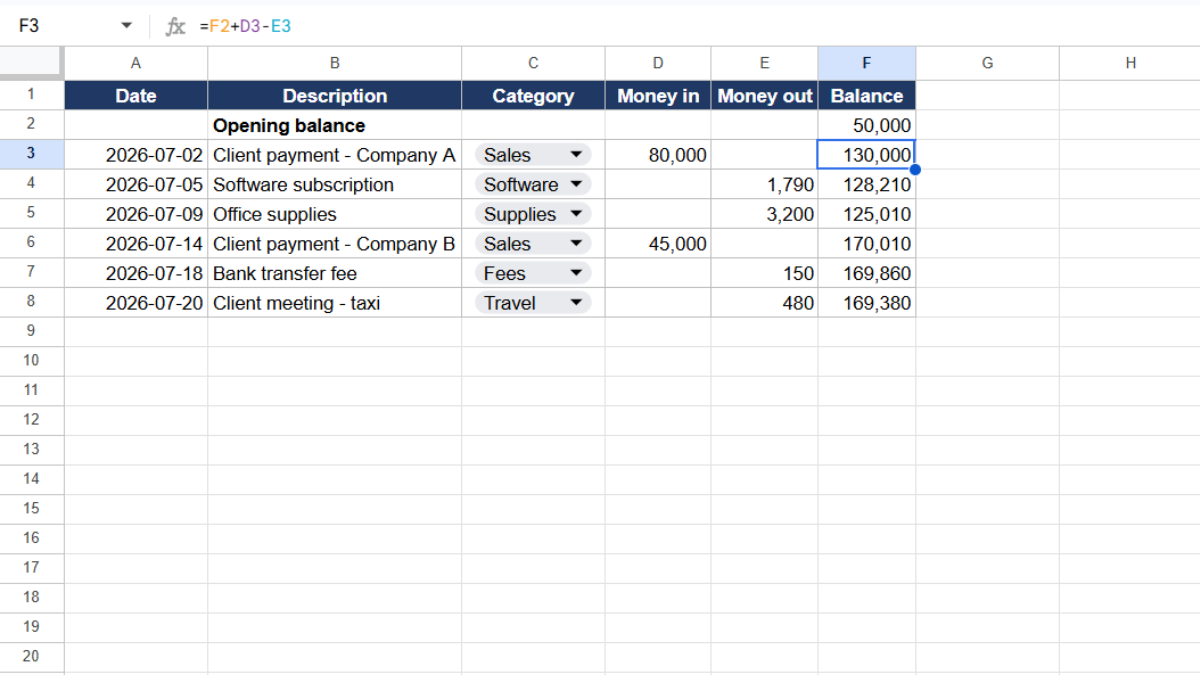
The running balance is what turns a list into a ledger. Start with your opening balance in F1 (or the top of the column).
In F2, enter:
=F1+D2-E2
Drag it down. Each row now takes the previous balance, adds anything received, and subtracts anything spent. Your current cash position is always the last number in column F.
How do you total income and expenses by category?
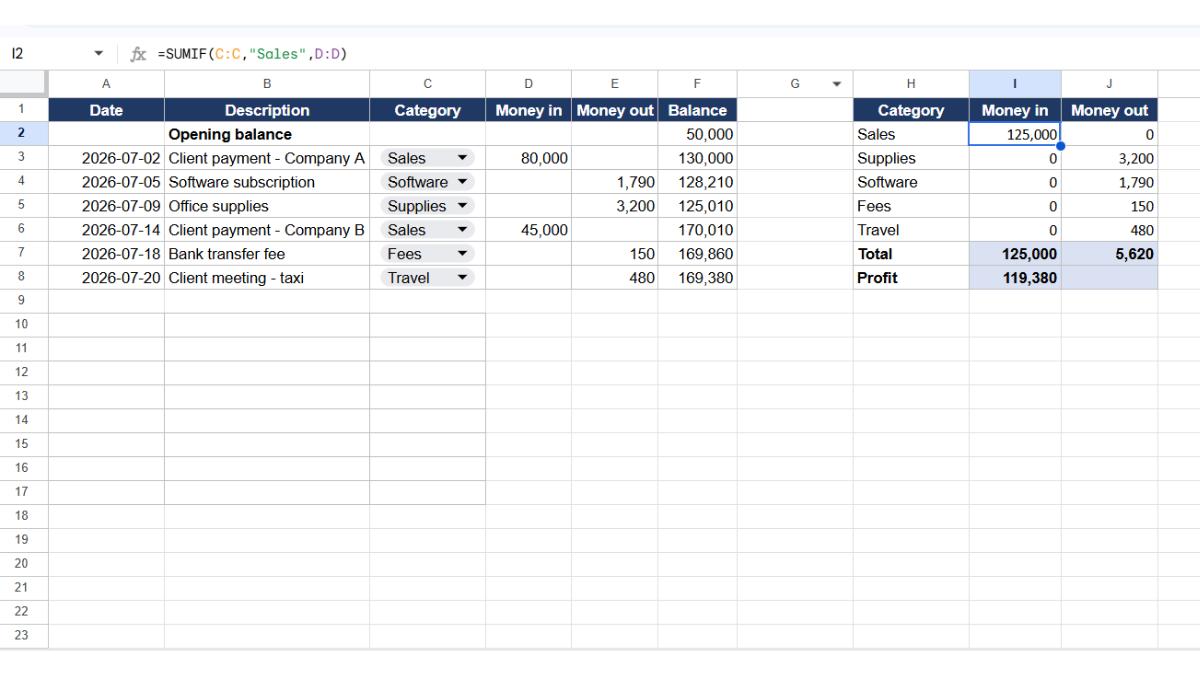
At tax time, you need totals per category. Set up a summary and use SUMIF.
For money received in a category:
=SUMIF(C:C, "Sales", D:D)
For money spent in a category:
=SUMIF(C:C, "Software", E:E)
For your totals overall, use =SUM(D:D) for all income and =SUM(E:E) for all expenses. Subtract them for your profit.
This summary is your simple profit-and-loss view, built from the same ledger.
How do you separate months or quarters?
Add a helper column. In G2:
=TEXT(A2, "YYYY-MM")
Now total any month with SUMIFS, combining the month label with a category. This makes quarterly reporting a matter of adding a few cells, not re-sorting your whole ledger.
Where does the paper trail live?
Here’s what separates a spreadsheet from real books: the paper trail. Every entry in a clean ledger should be backed by a document, the receipt for that expense, the invoice for that income.
Auditors ask for it. Tax authorities can ask for it. And when they do, “I have a number in a spreadsheet” is not the same as “here’s the receipt.” Those documents almost always live somewhere other than the ledger, which makes reconciling them a slow, manual chase.
This is where UpSheet fits in. UpSheet is a Google Sheets extension, built by The Conductor, that lets you drag and drop files straight onto a cell. You attach the receipt or invoice directly to its ledger entry.
Drop the document on the row, and UpSheet stores it in a dedicated Google Drive folder for that sheet, marking the cell with a 📎 paperclip. Every entry now carries its own proof, one click away.
In TABLE mode, each document stays tied to its entry even as you sort by date or category, so your audit trail holds together. Drag, Drop, Done.
Frequently asked questions
Can I do bookkeeping in Google Sheets?
Yes. A single-entry ledger in Google Sheets with date, description, category, money in, money out, and a running balance covers most small-business and freelance bookkeeping needs, with SUMIF for category totals at tax time.
How do I create a running balance in Google Sheets?
Put your opening balance at the top of the balance column, then in the next row use =previous balance + money in - money out, for example =F1+D2-E2. Drag it down so the balance updates after every entry.
How do I total expenses by category for taxes?
Use SUMIF in a summary, such as =SUMIF(category column, "Software", money-out column). Repeat for each category to build a simple profit-and-loss view from your ledger.
How do I keep receipts with my bookkeeping in Google Sheets?
Use UpSheet. Drag each receipt or invoice onto its ledger entry, and it saves to the sheet’s Drive folder with a paperclip marker, giving every entry an attached document for a clean audit trail.
Organize Your Work, Simplify Your Life
Good books are more than numbers. They’re numbers you can prove. UpSheet attaches the receipt or invoice to every entry, so your Google Sheets ledger becomes a genuine, auditable record.
Start your 14-day free trial. It works inside the Google Sheet you already use, so there’s nothing new to learn. Pro is $9.99/month (or $79.99/year) when you’re ready.