How to Create a Google Sheets Invoice Template
Make invoices in Google Sheets with a free template, automatic totals and tax, plus an invoice log where you attach every signed copy and proof of delivery.

Invoicing software is great until you realize you’re paying monthly to send a few invoices. For a freelancer or small business, Google Sheets does the job for free, and you can make it look professional.
The invoice itself is straightforward. The part people overlook is keeping track of them: which are paid, which are overdue, and where the signed copy went.
This guide builds a clean Google Sheets invoice template with automatic totals and tax, then adds a simple invoice log where every signed copy stays attached.
Key Highlights
- A Google Sheets invoice is a simple layout: your details, the client’s details, line items, and totals.
- One formula per line handles quantity times rate, and SUM builds your subtotal, tax, and total.
- A separate invoice log tracks which invoices are paid, unpaid, or overdue.
- Conditional formatting with TODAY() flags overdue invoices automatically.
- The signed copy and proof of delivery are what protect you if a client disputes. UpSheet is a Google Sheets extension by The Conductor that lets you attach the signed invoice to each row in your log, so proof is always on file.
How do you build the Google Sheets invoice template layout?
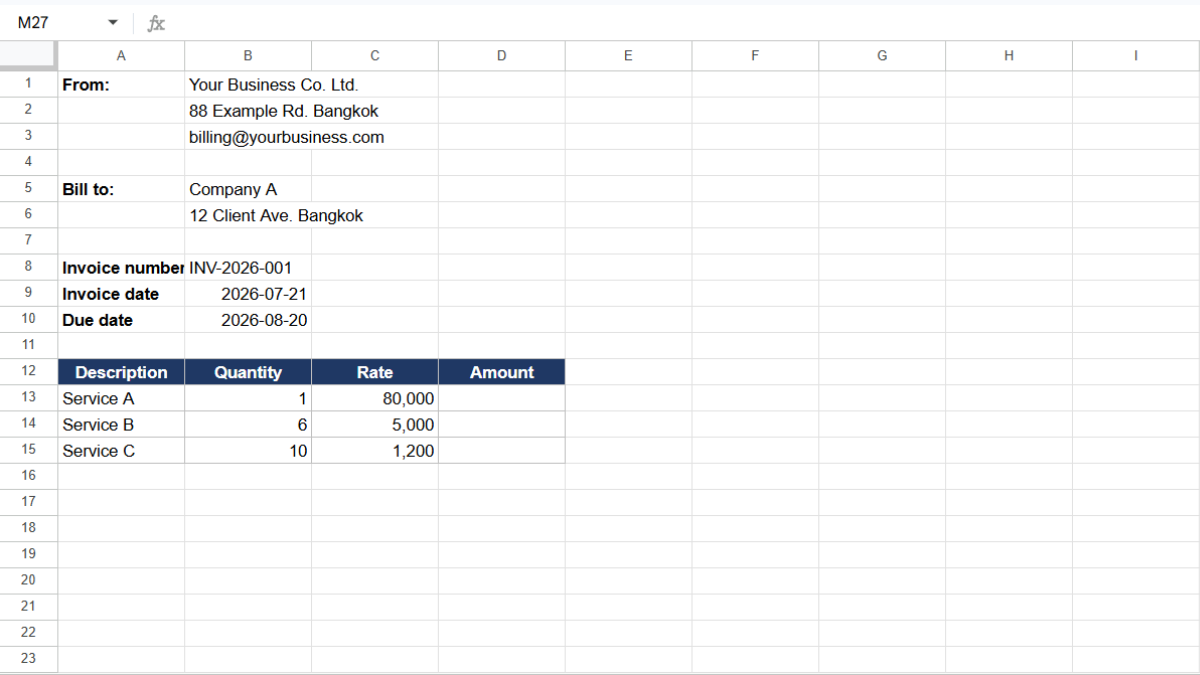
Open a new Google Sheet. Design the top as a document:
- From: your business name, address, and email.
- Bill to: the client’s name and details.
- Invoice number, invoice date, and due date.
Then add the line-item table:
- Description (A)
- Quantity (B)
- Rate (C)
- Amount (D)
How do you calculate totals and tax?
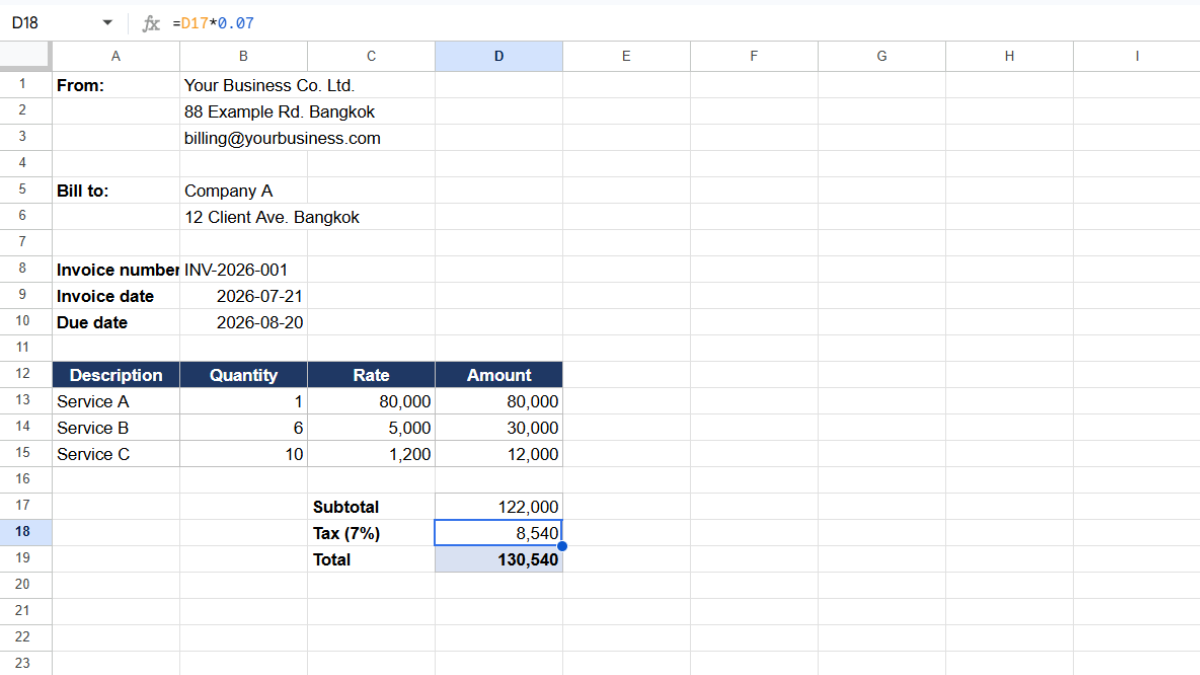
Each line’s amount is quantity times rate. In D2:
=B2*C2
Drag it down. Then below the table, build your totals:
- Subtotal: =SUM(D2:D20)
- Tax: =Subtotal*0.07 (swap 0.07 for your tax rate)
- Total: =Subtotal+Tax
Format these cells as currency (Format → Number → Currency). Your invoice now totals itself, tax included.
To reuse it, go to File → Make a copy for each new invoice, or keep a blank master tab you duplicate.
How do you track which invoices are paid?
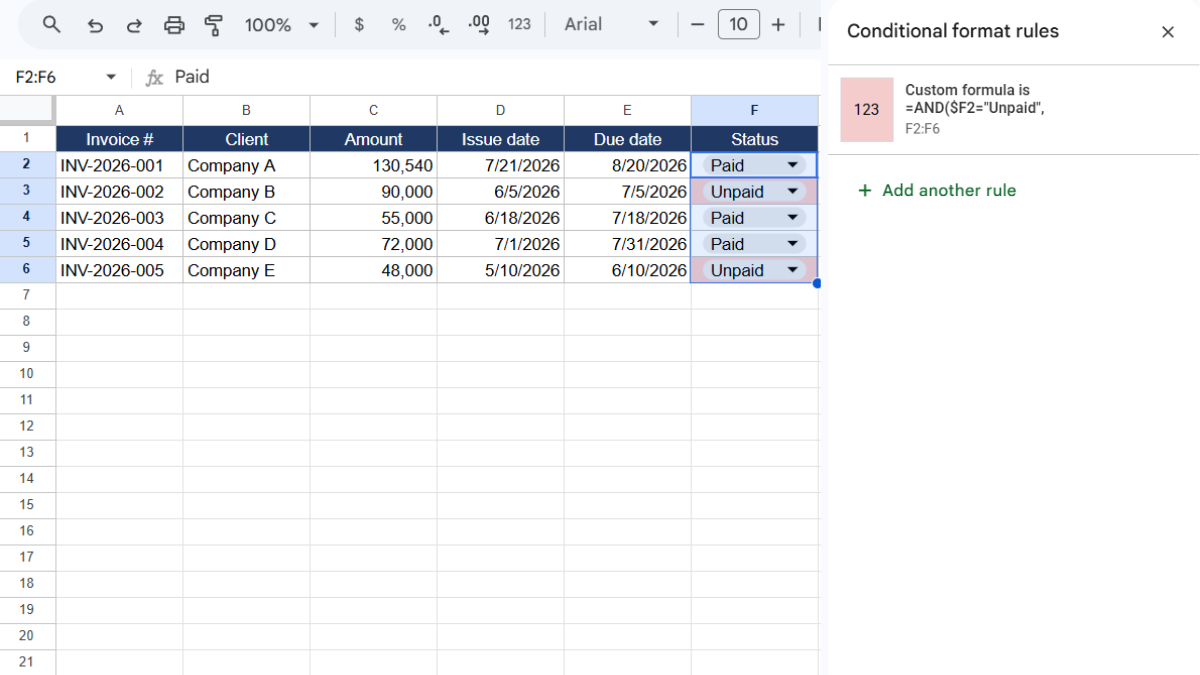
One invoice is easy. Twenty is where it gets messy. Add a second tab called Invoice log with these columns:
- Invoice # (A)
- Client (B)
- Amount (C)
- Issue date (D)
- Due date (E)
- Status (F), meaning Paid or Unpaid
Make Status a dropdown. Then flag overdue invoices with conditional formatting:
- Select your log rows and open Format → Conditional formatting.
- Choose Custom formula is and enter:
=AND($F2="Unpaid", $E2<TODAY())
- Set a red fill and click Done.
Now any unpaid invoice past its due date turns red on its own.
Where do the signed copies and proof go?
Here’s the gap that matters when money is on the line. You send an invoice. The client signs off, or you deliver the work and get a confirmation. Then what? That signed copy, that proof of delivery, is your protection if a payment is ever disputed.
But it lives in your email, not your invoice log. Months later, when a client questions a charge, you’re searching your inbox instead of clicking a row.
This is where UpSheet fits in. UpSheet is a Google Sheets extension, built by The Conductor, that lets you drag and drop files straight onto a cell. In your invoice log, you attach the signed copy or proof of delivery directly to each invoice’s row.
Drop the file on the row, and UpSheet stores it in a dedicated Google Drive folder for that sheet and marks the cell with a 📎 paperclip. Every invoice now carries its own paper trail, one click away.
In TABLE mode, each attached document stays tied to its invoice even as you sort the log by date or status. Drag, Drop, Done.
Frequently asked questions
How do I create an invoice in Google Sheets?
Lay out your business details, the client’s details, and an invoice number and dates, then add a line-item table. Use =quantity*rate per line, and SUM for the subtotal, with tax and total calculated below.
Is there a free invoice template in Google Sheets?
You can build a free, reusable invoice in minutes with a From block, a Bill To block, a line-item table, and auto-calculated totals, then copy it for each new invoice. Add UpSheet to keep signed copies attached in an invoice log.
How do I track unpaid invoices in Google Sheets?
Keep an invoice log with a status column, then use conditional formatting with =AND($F2="Unpaid", $E2<TODAY()) to turn overdue invoices red automatically.
How do I attach signed invoices in Google Sheets?
Use UpSheet. Drag the signed copy or proof of delivery onto its row in your invoice log, and it saves to the sheet’s Drive folder with a paperclip marker, so your proof stays attached to the record.
Organize Your Work, Simplify Your Life
Sending the invoice is half the job. Keeping the signed copy is what protects you. UpSheet attaches every signed invoice and delivery proof to its row, so your paper trail is always one click away.
Start your 14-day free trial. It works inside the Google Sheet you already use, so there’s nothing new to learn. Pro is $9.99/month (or $79.99/year) when you’re ready.